Usage with Python API
classify_image.py downloads the trained model from tensorflow.org when the program is run for the first time. You'll need about 200M of free space available on your hard disk.
Start by cloning the TensorFlow models repo from GitHub. Run the following commands:
cd models/tutorials/image/imagenet
python classify_image.py
The above command will classify a supplied image of a panda bear.
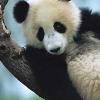
If the model runs correctly, the script will produce the following output:
giant panda, panda, panda bear, coon bear, Ailuropoda melanoleuca (score = 0.88493)
indri, indris, Indri indri, Indri brevicaudatus (score = 0.00878)
lesser panda, red panda, panda, bear cat, cat bear, Ailurus fulgens (score = 0.00317)
custard apple (score = 0.00149)
earthstar (score = 0.00127)
If you wish to supply other JPEG images, you may do so by editing the
--image_file argument.If you download the model data to a different directory, you will need to point--model_dirto the directory used.

Nessun commento:
Posta un commento